Marzipan: An Engineering Leader's Perspective on Bringing UIKit to the Mac
/There has been a lot of discussion in the Apple pundit community about running UIKit apps on the Mac (aka Marzipan). A lot of the coverage has been that of the customer's perspective, but thinking about it from Apple's internal perspective is far more interesting.
I want to first set some context that I think heavily influenced this decision. Over the last several years there have been some thematic concerns from the Apple community. The first is concerns about software quality as classically outlined by Marco Arment's Apple has lost the functional high ground post. Another theme that emerged was that macOS has been neglected as iOS rose to prominence. Additionally, the Mac App Store hasn't seen a lot of love from Apple and several major and indie developers have pulled their apps due to App Store guidelines. Finally, there has been a theme of worry that the iPad is being neglected. There were signs of hope in iOS 9 and iOS 11 but hasn't seen the annual incremental functionality that the iPhone has seen.
Hire More Developers
I firmly believe that Apple, like most great consumer companies does listen to customer feedback and takes it very seriously. The common answer to solving these problems from the Apple community is to simply throw more engineers at the problem. You hear: "Apple has $285B, surely they can put more engineers on X." This is actually quite harder than you think.
The Tim Cook era Apple is all about discipline and math built on top of the Steve Jobs legacy. You can argue qualitatively about how that's going, but by quantitative measures it's hard to argue anything short of very successful. If you layer discipline and math to frame how Apple would solve these problems with management principles it becomes very interesting.
Revenue
In Q2 2018, Apple spent $666M on R&D with $61.1B in revenue. That equates to 1.09% of revenue being spent on R&D. In Q2 2017, Apple spent $575M on R&D with $52.9B. That also equates to 1.09% of revenue being spent on R&D. From a budget and planning perspective, it's clear that Apple is having budget discipline with growing R&D spend in line with revenue growth. So assume that R&D growth will be capped to staying inline with 1.09% for the foreseeable future.
Next, let's look at how iPhone, iPad and Mac impact company as a percentage of revenue for Q2 2018. Again, they generated $61.1B in revenue. Let's look at the breakdown below:
| Product | Q218 Revenue $B |
|---|---|
| iPhone | $38.03 |
| iPad | $4.11 |
| Mac | $5.85 |
| Other Products | $3.95 |
| Services | $9.19 |
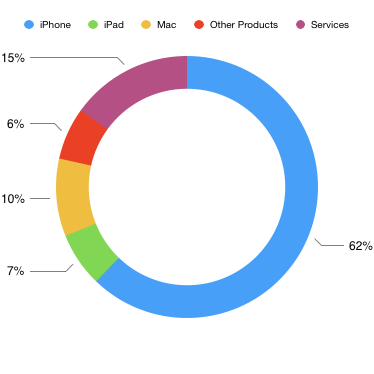
Apple Q2 2018 revenue by product line
Now that we know where revenue is coming from, and we factor in that R&D investment increases in-line with revenue we can make some assumptions. For every 100 engineers that Apple hires, 62 should go to iPhone, 15 to Services, 10 to macOS, 7 to iPad and 6 to Other Products. That seems simple, and given that macOS and iPad get some new resources, surely things will somehow get better... However, this is missing a huge factor: Where growth is coming from.
Growth
Year over Year, Apple generated $8.21B in incremental revenue. The main drivers were iPhone, Services and Other Products. The iPad and Mac drove little to no growth. Below we see the full breakdown:
| Product | Q218 Growth $B |
|---|---|
| iPhone | $4.75 |
| iPad | $0.22 |
| Mac | $0.01 |
| Other Products | $1.08 |
| Services | $2.15 |
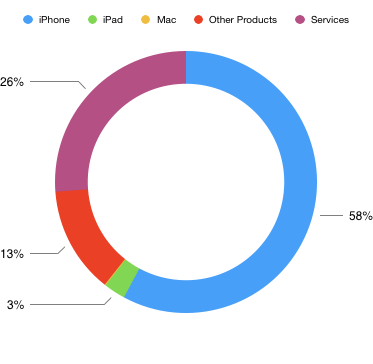
Apple Q2 2018 YoY revenue growth by product line
Factoring in where growth is coming from we can make some new assumptions. For every 100 engineers that Apple hires, 58 should go to iPhone, 26 to services, 13 to other products, 3 to iPad and 0 to macOS. This seems to be closer to what Apple has been doing the last few years. We have seen solid improvements to iPhone features in iOS. Improvements and new services such as Apple Music, Apple Photos, CloudKit, Messages in the Cloud, etc... Expansion and improvements to the other products such as Apple Watch, AirPods, Apple TV, HomePod, etc... iPad has gotten some love but usually every other year, and gets some halo effect due to iOS being a shared platform across iPhone and iPad. macOS, not a ton of new functionality but existing resources can keep chugging along.
Future Growth
However, we are missing one critical assumption here. Apple has always had a focus on where future revenue growth is coming from. At the most basic level, you can shift more investment to the fastest growing segment if you believe that it will continue or accelerate with investment. In this case, Services and Other Products, which have shown faster progress in the last few years.
The other option is to create incremental products. The most exciting products at Apple are the ones we know nothing about. It is certain that Apple allocates a percentage of R&D investment to incremental product lines to unlock incremental growth as iPhone growth matures. As a result, the resource mixes above are reallocated. iPhone may be getting more, Services may be getting even more, new product lines are getting resources as well. Project Titan was rumored at one point to have over 1000 employees, and it still hasn't/may never see the light of day. Which illustrates that Apple is willing to make big bets. An example of this is when Steve Jobs delayed Leopard to divert as many engineers as possible to the iPhone.
Talent Availability
Labor market constraints also add considerable challenges in scaling Apple's software capabilities. There are only so many iOS/Mac developers out there that:
- Meet the technical requirements to work at Apple (Objective-C/Swift, UIKit, AppKit, etc...)
- Are willing to live where Apple does business
- Have domain expertise (Audio, Video, AR, Machine Learning, etc...)
- Willing to abide by Apple's secrecy
- Willing to forfeit side-projects
Even if Tim Cook gave the go ahead to hire as many resources as needed to make the Mac great, the people may not exist. You can only hire and onboard so many new engineers at a time without impacting quality and stressing the broader organization. Product Managers, Product Marketing and other functions that are at the beginning of the product development lifecycle need to be several months ahead in the process.
Combining the factors of revenue mix, current growth rates, where future growth is likely to happen, talent availability and Apple's discipline keeping R&D spend at 1.09% of revenue you have 2 essential levers to pull in the magical software machine to address these concerns.
- Re-prioritize
- Platform Leverage
Re-prioritize
Apple could divert more resources to the Mac or iPad functionality in iOS, the trade off is stealing resources from future sources of growth. If macOS being behind was only a short-term issue and didn't need ongoing investment it may make sense. However, if it is a long term investment you have to have a degree of confidence that the Mac is a source of future growth on an ongoing basis. All signs point to that not being the case.
Platform Leverage
The other option is how do we get more leverage out of the resources that Apple currently has and get more leverage out of every incremental engineer they hire. This is clearly the strategy Apple is employing here. The basic premise is if Apple can consolidate to a smaller number of software platforms to maintain and enhance, agility and quality improve. The entire ecosystem will benefit as a result.
I'm not saying that Apple will eliminate macOS and have iOS running on MacBooks. This means unifying foundation level technologies across iOS, macOS, watchOS, tvOS, etc... as a first step. Once you complete this process, any incremental functionality introduced spans across all of these platforms. The QA you do at this level also benefits every experience. You start low in the stack and work your way up to the customer experience over time.
One place Apple has already done this is with the iTunes Store. What started as Music only, then expanded to TV Shows, Movies and eventually the App Stores. It's all sharing the same underlying infrastructure. Apple has invested heavily in modernizing the underlying architecture of the iTunes store, once that process matured they moved to the user experience in 2016/2017.
UIKit to the Mac
So how does the concept of Platform Leverage apply to the UIKit on the Mac? Let's go back to our original statements of what Apple's problems are:
- Software Quality
- macOS Neglect
- Mac App Store Neglect
- iPad Neglect
Software Quality
The first step of unifying underlying system frameworks will have a big benefit from a quality perspective. This reduces the number of total frameworks QA needs to test while QA staffing remains equal or grows. This is more total QA attention. The same concept applies from an engineering perspective and a test coverage perspective. Further, by bringing iOS apps to the Mac, first party app quality goes up as well. These apps are used by many more users on iOS, get more engineering attention, and more QA time as well. This increases overall software quality on the Mac. It also reduces the amount of new code they have to write, which does not introduce new defects. As UIKit on Mac matures to its end state, you get even more leverage as you can combine more iOS and macOS resources.
macOS Neglect
If Apple can take existing iOS apps that have more features (or missing from macOS completely) and bring them to macOS, the Mac platform gets feature parity with iOS at a much lower cost.There are also more external developers that currently use UIKit vs AppKit so the opportunity for new macOS apps increases substantially. The barrier to entry is far lower. Additionally, developers that have been nervous about major updates to their Mac software, but have a more modern iOS version can bring a major update to market with less effort. This isn't true for every app, but for most apps that normal people (not geeks) use this is probably the case. Some argue that UIKit apps are not Mac Apps, that is true, Mac Apps as we know them. For the average user, UIKit apps will make the Mac a more accessible platform that is easier to use.
Mac App Store Neglect
The iOS App Store saw a big overhaul in 2017 with iOS 11. The Mac App Store overhaul for Mojave this year is all about platform and resource leverage. The tooling built to do content features in iOS can be leveraged for macOS and increase the quality of the Mac App Store. Apple also gets resource leverage from editorial staff, writing and content attracting users to open the store more frequently. This will increase substantially when 3rd Party UIKit Apps start coming out. An article about a great To Do List app can now be published on both the iOS & Mac App Stores. This, combined with more apps, and getting some famous developers back on the platform make the Mac App Store much more compelling to the average Mac user.
iPad Neglect
The solution to iPad neglect develops over time, but I think the iPad will benefit in a big way. Apple has had issues getting large software vendors to build Pro Apps for the iPad. Opening up UIKit to the Mac will help with that problem over time. Before UIKit comes to the Mac for third party developers, Apple needs to solve how to do multiple windows, shared app instances, menu bars, etc... These features will directly benefit the iPad in the coming years. It'll make app multi-tasking better, drag and drop support better, having 2 windows of an app, etc.. User input device support for the Mac will also benefit the iPad. A bluetooth mouse being the first that comes to mind. Not usable in every app/context, but a text cursor would be huge. For third party developers who have avoided iPad apps due to market size, specifically in the pro market, will have more incentive to come to iPad.
Where is this headed?
My best guess is UIKit on the Mac as presented at WWDC 2018 is in the very early phases. Bringing a small number of UIKit Apps to the Mac in Mojave is more about a proof of technology than anything else. These apps aren't super valuable from a user perspective, but extremely valuable from an engineering perspective. With a fully automated test suite (unit tests, integration tests, UI Automation) you can begin to do the work of unifying the foundation of iOS and macOS and have a ton of visibility on how well you're doing.
Once you get all foundational frameworks running happily on iOS and MacOS, you then start moving closer to the user experience. Multi-window support, menu bar support, user input devices, drag and drop (which may already be solved) and other features need to be supported. Maybe it gets built into UIKit or maybe it's a new framework. It could be both over time. Regardless, over time we will see more powerful apps come to the iPad and simpler more iOS like apps to the Mac. This will expand the potential market for both iPad and the Mac. More pro users will be able to do their work on the iPad. The touch-input generation will have apps on the Mac that work the way they expect them. This could extend the Mac to another generation of computer users, especially as that generation moves into the work force.
Ultimately I think Apple will come out with a new UI Framework that sits on top of all their OS's but I think that's a few years away. It'll start with UIKit portability on the Mac and over time base functionality for Mac being built into iOS. I expect that to be the short term strategy. Long term, assuming they're serious about Swift, I envision a native Swift UI library with modern design patterns that spans all of their OS's. Including watchOS, tvOS and any future product with a UI.
Finally, you don’t have to agree with how Apple decides to allocate it’s resources, but hopefully this gives you an idea of how resources get allocated in a large company such as Apple.